

Profiling
Quick profiling in your terminal
Note
This is only meant to be used for quick profiling or programmatically accessing the profiling results. For more detailed and GUI friendly profiling proceed to the next section.
Simply replace the use of Base.@time or Base.@timed with Reactant.Profiler.@time or Reactant.Profiler.@timed. We will automatically compile the function if it is not already a Reactant compiled function (with sync=true).
using Reactant

x = Reactant.to_rarray(randn(Float32, 100, 2))
W = Reactant.to_rarray(randn(Float32, 10, 100))
b = Reactant.to_rarray(randn(Float32, 10))

linear(x, W, b) = (W * x) .+ b

Reactant.@time linear(x, W, b)
┌ Debug: Profiling directory: /home/runner/.julia/scratchspaces/3c362404-f566-11ee-1572-e11a4b42c853/reactant_profiling/jl_imTFjQ
└ @ Reactant.Profiler ~/work/Reactant.jl/Reactant.jl/src/Profiler.jl:824
WARNING: All log messages before absl::InitializeLog() is called are written to STDERR
I0000 00:00:1792945309.736044 4441 profiler_session.cc:171] Profiler session initializing.
I0000 00:00:1792945309.736089 4441 profiler_session.cc:186] Profiler session started.
I0000 00:00:1792945309.736529 4441 profiler_session.cc:134] Profiler session collecting data.
I0000 00:00:1792945309.781513 4441 save_profile.cc:206] Collecting XSpace to repository: /home/runner/.julia/scratchspaces/3c362404-f566-11ee-1572-e11a4b42c853/reactant_profiling/jl_imTFjQ/plugins/profile/2026_10_25_16_21_49/runnervmr9t6g.xplane.pb
I0000 00:00:1792945309.782244 4441 save_profile.cc:179] Creating directory: /home/runner/.julia/scratchspaces/3c362404-f566-11ee-1572-e11a4b42c853/reactant_profiling/jl_imTFjQ/plugins/profile/2026_10_25_16_21_49
I0000 00:00:1792945309.782368 4441 save_profile.cc:185] Dumped gzipped tool data for trace.json.gz to /home/runner/.julia/scratchspaces/3c362404-f566-11ee-1572-e11a4b42c853/reactant_profiling/jl_imTFjQ/plugins/profile/2026_10_25_16_21_49/runnervmr9t6g.trace.json.gz
I0000 00:00:1792945309.782408 4441 profiler_session.cc:217] Profiler session tear down.
┌ Debug: Starting XProf gRPC server...
└ @ Reactant.Profiler ~/work/Reactant.jl/Reactant.jl/src/Profiler.jl:796
┌ Debug: Initializing XProf stubs for worker service at 0.0.0.0:33633
└ @ Reactant.Profiler ~/work/Reactant.jl/Reactant.jl/src/Profiler.jl:595
I0000 00:00:1792945309.798869 4441 stub_factory.cc:163] Created gRPC channel for address: 0.0.0.0:33633
┌ Debug: Starting XProf gRPC server on port 33633
└ @ Reactant.Profiler ~/work/Reactant.jl/Reactant.jl/src/Profiler.jl:611
I0000 00:00:1792945309.799340 4441 grpc_server.cc:94] Server listening on 0.0.0.0:33633 with max_concurrent_requests 1
I0000 00:00:1792945309.810809 4441 xplane_to_tools_data_with_profile_processor.cc:142] serving tool: memory_profile with options: {} using ProfileProcessor session_id: /home/runner/.julia/scratchspaces/3c362404-f566-11ee-1572-e11a4b42c853/reactant_profiling/jl_imTFjQ/plugins/profile/2026_10_25_16_21_49
I0000 00:00:1792945309.810835 4441 xplane_to_tools_data_with_profile_processor.cc:165] Using local processing for tool: memory_profile
I0000 00:00:1792945309.810839 4441 memory_profile_processor.cc:47] Processing memory profile for host: runnervmr9t6g
I0000 00:00:1792945309.811416 4441 xplane_to_tools_data_with_profile_processor.cc:170] Total time for tool memory_profile: 591.54us session_id: /home/runner/.julia/scratchspaces/3c362404-f566-11ee-1572-e11a4b42c853/reactant_profiling/jl_imTFjQ/plugins/profile/2026_10_25_16_21_49
I0000 00:00:1792945309.828155 4441 xplane_to_tools_data_with_profile_processor.cc:142] serving tool: op_profile with options: {} using ProfileProcessor session_id: /home/runner/.julia/scratchspaces/3c362404-f566-11ee-1572-e11a4b42c853/reactant_profiling/jl_imTFjQ/plugins/profile/2026_10_25_16_21_49
I0000 00:00:1792945309.828182 4441 xplane_to_tools_data_with_profile_processor.cc:165] Using local processing for tool: op_profile
I0000 00:00:1792945309.828186 4441 multi_xplanes_to_op_stats.cc:118] ConvertMultiXSpaceToCombinedOpStatsWithCache: Started
I0000 00:00:1792945309.828246 4441 multi_xplanes_to_op_stats.cc:134] ConvertMultiXSpaceToCombinedOpStatsWithCache: Cache miss, calling ConvertMultiXSpacesToCombinedOpStats
I0000 00:00:1792945309.828249 4441 multi_xplanes_to_op_stats.cc:45] ConvertMultiXSpacesToCombinedOpStats: Started. Number of XSpaces: 1
I0000 00:00:1792945309.828255 4441 multi_xplanes_to_op_stats.cc:55] ConvertMultiXSpacesToCombinedOpStats: Starting to process XSpace 0/1
I0000 00:00:1792945309.828725 4441 derived_timeline.cc:693] GenerateDerivedTimeLines: creating derived_timeline_trace_events XprofThreadPoolExecutor
I0000 00:00:1792945309.828737 4441 xprof_thread_pool_executor.cc:22] Creating derived_timeline_trace_events XprofThreadPoolExecutor with 4 threads.
I0000 00:00:1792945309.828974 4441 derived_timeline.cc:705] GenerateDerivedTimeLines: waiting for derived_timeline_trace_events threads to join
I0000 00:00:1792945309.829239 4441 derived_timeline.cc:709] GenerateDerivedTimeLines: derived_timeline_trace_events threads joined successfully
I0000 00:00:1792945309.923913 4441 derived_timeline.cc:758] GenerateDerivedTimeLines: creating ProcessTensorCorePlanes XprofThreadPoolExecutor
I0000 00:00:1792945309.924344 4441 xprof_thread_pool_executor.cc:22] Creating ProcessTensorCorePlanes XprofThreadPoolExecutor with 4 threads.
I0000 00:00:1792945309.924579 4441 derived_timeline.cc:769] GenerateDerivedTimeLines: waiting for ProcessTensorCorePlanes threads to join
I0000 00:00:1792945309.924806 4441 derived_timeline.cc:772] GenerateDerivedTimeLines: ProcessTensorCorePlanes threads joined successfully
I0000 00:00:1792945310.079544 4441 xplane_to_op_stats.cc:405] ConvertXSpaceToOpStats: creating op_stats_threads XprofThreadPoolExecutor
I0000 00:00:1792945310.080003 4441 xprof_thread_pool_executor.cc:22] Creating op_stats_threads XprofThreadPoolExecutor with 4 threads.
I0000 00:00:1792945310.080219 4441 xplane_to_op_stats.cc:461] ConvertXSpaceToOpStats: Scheduled 0 OpMetricsDb generation tasks.
I0000 00:00:1792945310.080491 4441 xplane_to_op_stats.cc:417] ConvertXSpaceToOpStats: Combining 0 op_metrics_dbs.
I0000 00:00:1792945310.080509 4441 xplane_to_op_stats.cc:422] ConvertXSpaceToOpStats: Finished combining op_metrics_dbs.
I0000 00:00:1792945310.098155 4441 xplane_to_op_stats.cc:687] ConvertXSpaceToOpStats: Final OpStats size: 242 bytes (0.000230789 MiB).
I0000 00:00:1792945310.125235 4441 multi_xplanes_to_op_stats.cc:67] ConvertMultiXSpacesToCombinedOpStats: Finished processing XSpace 0.
I0000 00:00:1792945310.125697 4441 multi_xplanes_to_op_stats.cc:72] ConvertMultiXSpacesToCombinedOpStats: Finished extracting all 1 OpStats. Time: 297.451061ms
I0000 00:00:1792945310.125710 4441 multi_xplanes_to_op_stats.cc:85] ConvertMultiXSpacesToCombinedOpStats: Starting ComputeStepIntersectionToMergeOpStats.
I0000 00:00:1792945310.125714 4441 multi_xplanes_to_op_stats.cc:94] ConvertMultiXSpacesToCombinedOpStats: Finished ComputeStepIntersectionToMergeOpStats in 2.465us
I0000 00:00:1792945310.125716 4441 multi_xplanes_to_op_stats.cc:99] ConvertMultiXSpacesToCombinedOpStats: Starting CombineAllOpStats.
I0000 00:00:1792945310.125722 4441 multi_xplanes_to_op_stats.cc:106] ConvertMultiXSpacesToCombinedOpStats: Finished CombineAllOpStats in 4.668us
I0000 00:00:1792945310.125724 4441 multi_xplanes_to_op_stats.cc:109] ConvertMultiXSpacesToCombinedOpStats: Overall Finished in 297.475938ms
I0000 00:00:1792945310.125728 4441 multi_xplanes_to_op_stats.cc:138] ConvertMultiXSpaceToCombinedOpStatsWithCache: Starting to write cache file.
I0000 00:00:1792945310.125850 4441 multi_xplanes_to_op_stats.cc:145] ConvertMultiXSpaceToCombinedOpStatsWithCache: Finished writing cache file.
I0000 00:00:1792945310.125854 4441 multi_xplanes_to_op_stats.cc:149] ConvertMultiXSpaceToCombinedOpStatsWithCache: Overall Finished in 297.66905ms
I0000 00:00:1792945310.126023 4441 xplane_to_tools_data_with_profile_processor.cc:170] Total time for tool op_profile: 297.84985ms session_id: /home/runner/.julia/scratchspaces/3c362404-f566-11ee-1572-e11a4b42c853/reactant_profiling/jl_imTFjQ/plugins/profile/2026_10_25_16_21_49
┌ Debug: `op_profile` data missing keys for metrics
│ data_available_keys =
│ KeySet for a JSON.Object{String, Any} with 4 entries. Keys:
│ "byProgram"
│ "deviceType"
│ "byProgramExcludeIdle"
│ "aggDvfsTimeScaleMultiplier"
│ by_program_available_keys =
│ KeySet for a JSON.Object{String, Any} with 3 entries. Keys:
│ "name"
│ "children"
│ "numChildren"
└ @ Reactant.Profiler ~/work/Reactant.jl/Reactant.jl/src/Profiler.jl:1025
I0000 00:00:1792945310.451810 4441 xplane_to_tools_data_with_profile_processor.cc:142] serving tool: overview_page with options: {} using ProfileProcessor session_id: /home/runner/.julia/scratchspaces/3c362404-f566-11ee-1572-e11a4b42c853/reactant_profiling/jl_imTFjQ/plugins/profile/2026_10_25_16_21_49
I0000 00:00:1792945310.451837 4441 xplane_to_tools_data_with_profile_processor.cc:165] Using local processing for tool: overview_page
I0000 00:00:1792945310.451841 4441 overview_page_processor.cc:84] OverviewPageProcessor::ProcessSession: Started
I0000 00:00:1792945310.451844 4441 overview_page_processor.cc:86] OverviewPageProcessor::ProcessSession: Starting ConvertMultiXSpaceToCombinedOpStatsWithCache
I0000 00:00:1792945310.451846 4441 multi_xplanes_to_op_stats.cc:118] ConvertMultiXSpaceToCombinedOpStatsWithCache: Started
I0000 00:00:1792945310.451907 4441 multi_xplanes_to_op_stats.cc:126] ConvertMultiXSpaceToCombinedOpStatsWithCache: Cache hit, reading binary proto
I0000 00:00:1792945310.451959 4441 multi_xplanes_to_op_stats.cc:131] ConvertMultiXSpaceToCombinedOpStatsWithCache: Finished reading cache file.
I0000 00:00:1792945310.451962 4441 multi_xplanes_to_op_stats.cc:149] ConvertMultiXSpaceToCombinedOpStatsWithCache: Overall Finished in 116.499us
I0000 00:00:1792945310.451967 4441 overview_page_processor.cc:90] OverviewPageProcessor::ProcessSession: Starting ConvertOpStatsToOverviewPage
I0000 00:00:1792945310.451969 4441 op_stats_to_overview_page.cc:388] ConvertOpStatsToOverviewPage: Starting ComputeRunEnvironment
I0000 00:00:1792945310.451978 4441 op_stats_to_overview_page.cc:393] ConvertOpStatsToOverviewPage: Starting ComputeAnalysisResult
I0000 00:00:1792945310.451983 4441 op_stats_to_overview_page.cc:396] ConvertOpStatsToOverviewPage: Starting ConvertOpStatsToInputPipelineAnalysis
I0000 00:00:1792945310.452175 4441 op_stats_to_overview_page.cc:401] ConvertOpStatsToOverviewPage: Starting ComputeBottleneckAnalysis
I0000 00:00:1792945310.452182 4441 op_stats_to_overview_page.cc:407] ConvertOpStatsToOverviewPage: Starting ComputeGenericRecommendation
I0000 00:00:1792945310.452303 4441 op_stats_to_overview_page.cc:412] ConvertOpStatsToOverviewPage: Starting SetCommonRecommendation
I0000 00:00:1792945310.452319 4441 op_stats_to_overview_page.cc:425] ConvertOpStatsToOverviewPage: Starting PopulateOverviewDiagnostics
I0000 00:00:1792945310.452321 4441 op_stats_to_overview_page.cc:429] ConvertOpStatsToOverviewPage: Starting setting utilizations
I0000 00:00:1792945310.452323 4441 op_stats_to_overview_page.cc:435] ConvertOpStatsToOverviewPage: Overall Finished in 354.545us
I0000 00:00:1792945310.452326 4441 overview_page_processor.cc:94] OverviewPageProcessor::ProcessSession: Not a training run, Starting to convert inference stats.
I0000 00:00:1792945310.452334 4441 xprof_thread_pool_executor.cc:22] Creating ConvertMultiXSpaceToInferenceStats XprofThreadPoolExecutor with 1 threads.
I0000 00:00:1792945310.453018 4441 overview_page_processor.cc:99] OverviewPageProcessor::ProcessSession: Starting to compute InferenceLatency
I0000 00:00:1792945310.453031 4441 overview_page_processor.cc:104] OverviewPageProcessor::ProcessSession: Starting to serialize OverviewPage toJson
I0000 00:00:1792945310.453330 4441 overview_page_processor.cc:107] OverviewPageProcessor::ProcessSession: Starting to set Output
I0000 00:00:1792945310.453337 4441 overview_page_processor.cc:109] OverviewPageProcessor::ProcessSession: Overall Finished in 1.496558ms
I0000 00:00:1792945310.453354 4441 xplane_to_tools_data_with_profile_processor.cc:170] Total time for tool overview_page: 1.521495ms session_id: /home/runner/.julia/scratchspaces/3c362404-f566-11ee-1572-e11a4b42c853/reactant_profiling/jl_imTFjQ/plugins/profile/2026_10_25_16_21_49
runtime: 0.00036659s
compile time: 0.74391173sReactant.@timed nrepeat=100 linear(x, W, b)AggregateProfilingResult(
runtime = 0.00003365s,
compile_time = 0.14153977s, )Note that the information returned depends on the backend. Specifically CUDA and TPU backends provide more detailed information regarding memory usage and allocation (something like the following will be displayed on GPUs):
AggregateProfilingResult(
    runtime = 0.00003829s,
    compile_time = 2.18053260s,  # time spent compiling by Reactant
    GPU_0_bfc = MemoryProfileSummary(
        peak_bytes_usage_lifetime = 64.010 MiB,  # peak memory usage over the entire program (lifetime of memory allocator)
        peak_stats = MemoryAggregationStats(
            stack_reserved_bytes = 0 bytes,  # memory usage by stack reservation
            heap_allocated_bytes = 30.750 KiB,  # memory usage by heap allocation
            free_memory_bytes = 23.518 GiB,  # free memory available for allocation or reservation
            fragmentation = 0.514931,  # fragmentation of memory within [0, 1]
            peak_bytes_in_use = 30.750 KiB # The peak memory usage over the entire program
        )
        peak_stats_time = 0.04975365s,
        memory_capacity = 23.518 GiB # memory capacity of the allocator
    )
    flops = FlopsSummary(
        Flops = 2.8369974648038653e-9,  # [flops / (peak flops * program time)], capped at 1.0
        UncappedFlops = 2.8369974648038653e-9,
        RawFlops = 4060.0,  # Total FLOPs performed
        BF16Flops = 4060.0,  # Total FLOPs Normalized to the bf16 (default) devices peak bandwidth
        RawTime = 0.00040298422s,  # Raw time in seconds
        RawFlopsRate = 1.0074836180930361e7,  # Raw FLOPs rate in FLOPs/seconds
        BF16FlopsRate = 1.0074836180930361e7,  # BF16 FLOPs rate in FLOPs/seconds
    )
)
Additionally for GPUs and TPUs, we can use the Reactant.@profile macro to profile the function and get information regarding each of the kernels executed.
Reactant.@profile linear(x, W, b)┌ Debug: Profiling directory: /home/runner/.julia/scratchspaces/3c362404-f566-11ee-1572-e11a4b42c853/reactant_profiling/jl_XPUCeW
└ @ Reactant.Profiler ~/work/Reactant.jl/Reactant.jl/src/Profiler.jl:824
I0000 00:00:1792945311.554123 4441 profiler_session.cc:171] Profiler session initializing.
I0000 00:00:1792945311.554139 4441 profiler_session.cc:186] Profiler session started.
I0000 00:00:1792945311.554234 4441 profiler_session.cc:134] Profiler session collecting data.
I0000 00:00:1792945311.591723 4441 save_profile.cc:206] Collecting XSpace to repository: /home/runner/.julia/scratchspaces/3c362404-f566-11ee-1572-e11a4b42c853/reactant_profiling/jl_XPUCeW/plugins/profile/2026_10_25_16_21_51/runnervmr9t6g.xplane.pb
I0000 00:00:1792945311.592547 4441 save_profile.cc:179] Creating directory: /home/runner/.julia/scratchspaces/3c362404-f566-11ee-1572-e11a4b42c853/reactant_profiling/jl_XPUCeW/plugins/profile/2026_10_25_16_21_51
I0000 00:00:1792945311.592696 4441 save_profile.cc:185] Dumped gzipped tool data for trace.json.gz to /home/runner/.julia/scratchspaces/3c362404-f566-11ee-1572-e11a4b42c853/reactant_profiling/jl_XPUCeW/plugins/profile/2026_10_25_16_21_51/runnervmr9t6g.trace.json.gz
I0000 00:00:1792945311.592734 4441 profiler_session.cc:217] Profiler session tear down.
I0000 00:00:1792945311.592812 4441 xplane_to_tools_data_with_profile_processor.cc:142] serving tool: memory_profile with options: {} using ProfileProcessor session_id: /home/runner/.julia/scratchspaces/3c362404-f566-11ee-1572-e11a4b42c853/reactant_profiling/jl_XPUCeW/plugins/profile/2026_10_25_16_21_51
I0000 00:00:1792945311.592818 4441 xplane_to_tools_data_with_profile_processor.cc:165] Using local processing for tool: memory_profile
I0000 00:00:1792945311.592821 4441 memory_profile_processor.cc:47] Processing memory profile for host: runnervmr9t6g
I0000 00:00:1792945311.593138 4441 xplane_to_tools_data_with_profile_processor.cc:170] Total time for tool memory_profile: 325.471us session_id: /home/runner/.julia/scratchspaces/3c362404-f566-11ee-1572-e11a4b42c853/reactant_profiling/jl_XPUCeW/plugins/profile/2026_10_25_16_21_51
I0000 00:00:1792945311.593166 4441 xplane_to_tools_data_with_profile_processor.cc:142] serving tool: op_profile with options: {} using ProfileProcessor session_id: /home/runner/.julia/scratchspaces/3c362404-f566-11ee-1572-e11a4b42c853/reactant_profiling/jl_XPUCeW/plugins/profile/2026_10_25_16_21_51
I0000 00:00:1792945311.593170 4441 xplane_to_tools_data_with_profile_processor.cc:165] Using local processing for tool: op_profile
I0000 00:00:1792945311.593172 4441 multi_xplanes_to_op_stats.cc:118] ConvertMultiXSpaceToCombinedOpStatsWithCache: Started
I0000 00:00:1792945311.593199 4441 multi_xplanes_to_op_stats.cc:134] ConvertMultiXSpaceToCombinedOpStatsWithCache: Cache miss, calling ConvertMultiXSpacesToCombinedOpStats
I0000 00:00:1792945311.593201 4441 multi_xplanes_to_op_stats.cc:45] ConvertMultiXSpacesToCombinedOpStats: Started. Number of XSpaces: 1
I0000 00:00:1792945311.593205 4441 multi_xplanes_to_op_stats.cc:55] ConvertMultiXSpacesToCombinedOpStats: Starting to process XSpace 0/1
I0000 00:00:1792945311.593458 4441 derived_timeline.cc:693] GenerateDerivedTimeLines: creating derived_timeline_trace_events XprofThreadPoolExecutor
I0000 00:00:1792945311.593466 4441 xprof_thread_pool_executor.cc:22] Creating derived_timeline_trace_events XprofThreadPoolExecutor with 4 threads.
I0000 00:00:1792945311.593689 4441 derived_timeline.cc:705] GenerateDerivedTimeLines: waiting for derived_timeline_trace_events threads to join
I0000 00:00:1792945311.593967 4441 derived_timeline.cc:709] GenerateDerivedTimeLines: derived_timeline_trace_events threads joined successfully
I0000 00:00:1792945311.673562 4441 derived_timeline.cc:758] GenerateDerivedTimeLines: creating ProcessTensorCorePlanes XprofThreadPoolExecutor
I0000 00:00:1792945311.673766 4441 xprof_thread_pool_executor.cc:22] Creating ProcessTensorCorePlanes XprofThreadPoolExecutor with 4 threads.
I0000 00:00:1792945311.674012 4441 derived_timeline.cc:769] GenerateDerivedTimeLines: waiting for ProcessTensorCorePlanes threads to join
I0000 00:00:1792945311.674246 4441 derived_timeline.cc:772] GenerateDerivedTimeLines: ProcessTensorCorePlanes threads joined successfully
I0000 00:00:1792945311.813445 4441 xplane_to_op_stats.cc:405] ConvertXSpaceToOpStats: creating op_stats_threads XprofThreadPoolExecutor
I0000 00:00:1792945311.813689 4441 xprof_thread_pool_executor.cc:22] Creating op_stats_threads XprofThreadPoolExecutor with 4 threads.
I0000 00:00:1792945311.813901 4441 xplane_to_op_stats.cc:461] ConvertXSpaceToOpStats: Scheduled 0 OpMetricsDb generation tasks.
I0000 00:00:1792945311.814130 4441 xplane_to_op_stats.cc:417] ConvertXSpaceToOpStats: Combining 0 op_metrics_dbs.
I0000 00:00:1792945311.814142 4441 xplane_to_op_stats.cc:422] ConvertXSpaceToOpStats: Finished combining op_metrics_dbs.
I0000 00:00:1792945311.830201 4441 xplane_to_op_stats.cc:687] ConvertXSpaceToOpStats: Final OpStats size: 282 bytes (0.000268936 MiB).
I0000 00:00:1792945311.854535 4441 multi_xplanes_to_op_stats.cc:67] ConvertMultiXSpacesToCombinedOpStats: Finished processing XSpace 0.
I0000 00:00:1792945311.854801 4441 multi_xplanes_to_op_stats.cc:72] ConvertMultiXSpacesToCombinedOpStats: Finished extracting all 1 OpStats. Time: 261.602387ms
I0000 00:00:1792945311.854808 4441 multi_xplanes_to_op_stats.cc:85] ConvertMultiXSpacesToCombinedOpStats: Starting ComputeStepIntersectionToMergeOpStats.
I0000 00:00:1792945311.854812 4441 multi_xplanes_to_op_stats.cc:94] ConvertMultiXSpacesToCombinedOpStats: Finished ComputeStepIntersectionToMergeOpStats in 2.544us
I0000 00:00:1792945311.854815 4441 multi_xplanes_to_op_stats.cc:99] ConvertMultiXSpacesToCombinedOpStats: Starting CombineAllOpStats.
I0000 00:00:1792945311.854821 4441 multi_xplanes_to_op_stats.cc:106] ConvertMultiXSpacesToCombinedOpStats: Finished CombineAllOpStats in 4.749us
I0000 00:00:1792945311.854823 4441 multi_xplanes_to_op_stats.cc:109] ConvertMultiXSpacesToCombinedOpStats: Overall Finished in 261.622305ms
I0000 00:00:1792945311.854827 4441 multi_xplanes_to_op_stats.cc:138] ConvertMultiXSpaceToCombinedOpStatsWithCache: Starting to write cache file.
I0000 00:00:1792945311.854946 4441 multi_xplanes_to_op_stats.cc:145] ConvertMultiXSpaceToCombinedOpStatsWithCache: Finished writing cache file.
I0000 00:00:1792945311.854950 4441 multi_xplanes_to_op_stats.cc:149] ConvertMultiXSpaceToCombinedOpStatsWithCache: Overall Finished in 261.778808ms
I0000 00:00:1792945311.854985 4441 xplane_to_tools_data_with_profile_processor.cc:170] Total time for tool op_profile: 261.821428ms session_id: /home/runner/.julia/scratchspaces/3c362404-f566-11ee-1572-e11a4b42c853/reactant_profiling/jl_XPUCeW/plugins/profile/2026_10_25_16_21_51
┌ Debug: `op_profile` data missing keys for metrics
│ data_available_keys =
│ KeySet for a JSON.Object{String, Any} with 4 entries. Keys:
│ "byProgram"
│ "deviceType"
│ "byProgramExcludeIdle"
│ "aggDvfsTimeScaleMultiplier"
│ by_program_available_keys =
│ KeySet for a JSON.Object{String, Any} with 3 entries. Keys:
│ "name"
│ "children"
│ "numChildren"
└ @ Reactant.Profiler ~/work/Reactant.jl/Reactant.jl/src/Profiler.jl:1025
I0000 00:00:1792945311.855444 4441 xplane_to_tools_data_with_profile_processor.cc:142] serving tool: overview_page with options: {} using ProfileProcessor session_id: /home/runner/.julia/scratchspaces/3c362404-f566-11ee-1572-e11a4b42c853/reactant_profiling/jl_XPUCeW/plugins/profile/2026_10_25_16_21_51
I0000 00:00:1792945311.855454 4441 xplane_to_tools_data_with_profile_processor.cc:165] Using local processing for tool: overview_page
I0000 00:00:1792945311.855457 4441 overview_page_processor.cc:84] OverviewPageProcessor::ProcessSession: Started
I0000 00:00:1792945311.855459 4441 overview_page_processor.cc:86] OverviewPageProcessor::ProcessSession: Starting ConvertMultiXSpaceToCombinedOpStatsWithCache
I0000 00:00:1792945311.855461 4441 multi_xplanes_to_op_stats.cc:118] ConvertMultiXSpaceToCombinedOpStatsWithCache: Started
I0000 00:00:1792945311.855502 4441 multi_xplanes_to_op_stats.cc:126] ConvertMultiXSpaceToCombinedOpStatsWithCache: Cache hit, reading binary proto
I0000 00:00:1792945311.855543 4441 multi_xplanes_to_op_stats.cc:131] ConvertMultiXSpaceToCombinedOpStatsWithCache: Finished reading cache file.
I0000 00:00:1792945311.855546 4441 multi_xplanes_to_op_stats.cc:149] ConvertMultiXSpaceToCombinedOpStatsWithCache: Overall Finished in 85.22us
I0000 00:00:1792945311.855548 4441 overview_page_processor.cc:90] OverviewPageProcessor::ProcessSession: Starting ConvertOpStatsToOverviewPage
I0000 00:00:1792945311.855551 4441 op_stats_to_overview_page.cc:388] ConvertOpStatsToOverviewPage: Starting ComputeRunEnvironment
I0000 00:00:1792945311.855555 4441 op_stats_to_overview_page.cc:393] ConvertOpStatsToOverviewPage: Starting ComputeAnalysisResult
I0000 00:00:1792945311.855559 4441 op_stats_to_overview_page.cc:396] ConvertOpStatsToOverviewPage: Starting ConvertOpStatsToInputPipelineAnalysis
I0000 00:00:1792945311.855626 4441 op_stats_to_overview_page.cc:401] ConvertOpStatsToOverviewPage: Starting ComputeBottleneckAnalysis
I0000 00:00:1792945311.855631 4441 op_stats_to_overview_page.cc:407] ConvertOpStatsToOverviewPage: Starting ComputeGenericRecommendation
I0000 00:00:1792945311.855640 4441 op_stats_to_overview_page.cc:412] ConvertOpStatsToOverviewPage: Starting SetCommonRecommendation
I0000 00:00:1792945311.855647 4441 op_stats_to_overview_page.cc:425] ConvertOpStatsToOverviewPage: Starting PopulateOverviewDiagnostics
I0000 00:00:1792945311.855649 4441 op_stats_to_overview_page.cc:429] ConvertOpStatsToOverviewPage: Starting setting utilizations
I0000 00:00:1792945311.855651 4441 op_stats_to_overview_page.cc:435] ConvertOpStatsToOverviewPage: Overall Finished in 100.799us
I0000 00:00:1792945311.855653 4441 overview_page_processor.cc:94] OverviewPageProcessor::ProcessSession: Not a training run, Starting to convert inference stats.
I0000 00:00:1792945311.855660 4441 xprof_thread_pool_executor.cc:22] Creating ConvertMultiXSpaceToInferenceStats XprofThreadPoolExecutor with 1 threads.
I0000 00:00:1792945311.857031 4441 overview_page_processor.cc:99] OverviewPageProcessor::ProcessSession: Starting to compute InferenceLatency
I0000 00:00:1792945311.857038 4441 overview_page_processor.cc:104] OverviewPageProcessor::ProcessSession: Starting to serialize OverviewPage toJson
I0000 00:00:1792945311.857338 4441 overview_page_processor.cc:107] OverviewPageProcessor::ProcessSession: Starting to set Output
I0000 00:00:1792945311.857346 4441 overview_page_processor.cc:109] OverviewPageProcessor::ProcessSession: Overall Finished in 1.889054ms
I0000 00:00:1792945311.857361 4441 xplane_to_tools_data_with_profile_processor.cc:170] Total time for tool overview_page: 1.909943ms session_id: /home/runner/.julia/scratchspaces/3c362404-f566-11ee-1572-e11a4b42c853/reactant_profiling/jl_XPUCeW/plugins/profile/2026_10_25_16_21_51
I0000 00:00:1792945311.961465 4441 xplane_to_tools_data_with_profile_processor.cc:142] serving tool: kernel_stats with options: {} using ProfileProcessor session_id: /home/runner/.julia/scratchspaces/3c362404-f566-11ee-1572-e11a4b42c853/reactant_profiling/jl_XPUCeW/plugins/profile/2026_10_25_16_21_51
I0000 00:00:1792945311.961494 4441 xplane_to_tools_data_with_profile_processor.cc:165] Using local processing for tool: kernel_stats
I0000 00:00:1792945311.961499 4441 multi_xplanes_to_op_stats.cc:118] ConvertMultiXSpaceToCombinedOpStatsWithCache: Started
I0000 00:00:1792945311.961557 4441 multi_xplanes_to_op_stats.cc:126] ConvertMultiXSpaceToCombinedOpStatsWithCache: Cache hit, reading binary proto
I0000 00:00:1792945311.961647 4441 multi_xplanes_to_op_stats.cc:131] ConvertMultiXSpaceToCombinedOpStatsWithCache: Finished reading cache file.
I0000 00:00:1792945311.961652 4441 multi_xplanes_to_op_stats.cc:149] ConvertMultiXSpaceToCombinedOpStatsWithCache: Overall Finished in 154.339us
I0000 00:00:1792945311.961727 4441 xplane_to_tools_data_with_profile_processor.cc:170] Total time for tool kernel_stats: 235.712us session_id: /home/runner/.julia/scratchspaces/3c362404-f566-11ee-1572-e11a4b42c853/reactant_profiling/jl_XPUCeW/plugins/profile/2026_10_25_16_21_51
I0000 00:00:1792945312.112688 4441 xplane_to_tools_data_with_profile_processor.cc:142] serving tool: framework_op_stats with options: {} using ProfileProcessor session_id: /home/runner/.julia/scratchspaces/3c362404-f566-11ee-1572-e11a4b42c853/reactant_profiling/jl_XPUCeW/plugins/profile/2026_10_25_16_21_51
I0000 00:00:1792945312.112714 4441 xplane_to_tools_data_with_profile_processor.cc:165] Using local processing for tool: framework_op_stats
I0000 00:00:1792945312.112718 4441 multi_xplanes_to_op_stats.cc:118] ConvertMultiXSpaceToCombinedOpStatsWithCache: Started
I0000 00:00:1792945312.112780 4441 multi_xplanes_to_op_stats.cc:126] ConvertMultiXSpaceToCombinedOpStatsWithCache: Cache hit, reading binary proto
I0000 00:00:1792945312.112833 4441 multi_xplanes_to_op_stats.cc:131] ConvertMultiXSpaceToCombinedOpStatsWithCache: Finished reading cache file.
I0000 00:00:1792945312.112835 4441 multi_xplanes_to_op_stats.cc:149] ConvertMultiXSpaceToCombinedOpStatsWithCache: Overall Finished in 118.142us
I0000 00:00:1792945312.113029 4441 xplane_to_tools_data_with_profile_processor.cc:170] Total time for tool framework_op_stats: 319.099us session_id: /home/runner/.julia/scratchspaces/3c362404-f566-11ee-1572-e11a4b42c853/reactant_profiling/jl_XPUCeW/plugins/profile/2026_10_25_16_21_51
╔================================================================================╗
║ SUMMARY ║
╚================================================================================╝
AggregateProfilingResult(
runtime = 0.00006851s,
compile_time = 0.11807870s, # time spent compiling by Reactant
)On GPUs this would look something like the following:
╔================================================================================╗
║ KERNEL STATISTICS                                                              ║
╚================================================================================╝

┌───────────────────┬─────────────┬────────────────┬──────────────┬──────────────┬──────────────┬──────────────┬───────────┬──────────┬────────────┬─────────────┐
│       Kernel Name │ Occurrences │ Total Duration │ Avg Duration │ Min Duration │ Max Duration │ Static Shmem │ Block Dim │ Grid Dim │ TensorCore │ Occupancy % │
├───────────────────┼─────────────┼────────────────┼──────────────┼──────────────┼──────────────┼──────────────┼───────────┼──────────┼────────────┼─────────────┤
│ gemm_fusion_dot_1 │           1 │    0.00000250s │  0.00000250s │  0.00000250s │  0.00000250s │    2.000 KiB │    64,1,1 │    1,1,1 │          ✗ │      100.0% │
│   loop_add_fusion │           1 │    0.00000131s │  0.00000131s │  0.00000131s │  0.00000131s │      0 bytes │    20,1,1 │    1,1,1 │          ✗ │       31.2% │
└───────────────────┴─────────────┴────────────────┴──────────────┴──────────────┴──────────────┴──────────────┴───────────┴──────────┴────────────┴─────────────┘

╔================================================================================╗
║ FRAMEWORK OP STATISTICS                                                        ║
╚================================================================================╝

┌───────────────────┬─────────┬─────────────┬─────────────┬─────────────────┬───────────────┬──────────┬───────────┬──────────────┬──────────┐
│         Operation │    Type │ Host/Device │ Occurrences │ Total Self-Time │ Avg Self-Time │ Device % │ Memory BW │    FLOP Rate │ Bound By │
├───────────────────┼─────────┼─────────────┼─────────────┼─────────────────┼───────────────┼──────────┼───────────┼──────────────┼──────────┤
│ gemm_fusion_dot.1 │ Unknown │      Device │           1 │     0.00000250s │   0.00000250s │   65.55% │ 1.82 GB/s │  1.6 GFLOP/s │      HBM │
│             +/add │     add │      Device │           1 │     0.00000131s │   0.00000131s │   34.45% │ 0.14 GB/s │ 0.05 GFLOP/s │      HBM │
└───────────────────┴─────────┴─────────────┴─────────────┴─────────────────┴───────────────┴──────────┴───────────┴──────────────┴──────────┘

╔================================================================================╗
║ SUMMARY                                                                        ║
╚================================================================================╝

AggregateProfilingResult(
    runtime = 0.00005622s,
    compile_time = 2.32802137s,  # time spent compiling by Reactant
    GPU_0_bfc = MemoryProfileSummary(
        peak_bytes_usage_lifetime = 64.010 MiB,  # peak memory usage over the entire program (lifetime of memory allocator)
        peak_stats = MemoryAggregationStats(
            stack_reserved_bytes = 0 bytes,  # memory usage by stack reservation
            heap_allocated_bytes = 81.750 KiB,  # memory usage by heap allocation
            free_memory_bytes = 23.518 GiB,  # free memory available for allocation or reservation
            fragmentation = 0.514564,  # fragmentation of memory within [0, 1]
            peak_bytes_in_use = 81.750 KiB # The peak memory usage over the entire program
        )
        peak_stats_time = 0.00608052s,
        memory_capacity = 23.518 GiB # memory capacity of the allocator
    )
    flops = FlopsSummary(
        Flops = 2.033375207640664e-8,  # [flops / (peak flops * program time)], capped at 1.0
        UncappedFlops = 2.033375207640664e-8,
        RawFlops = 4060.0,  # Total FLOPs performed
        BF16Flops = 4060.0,  # Total FLOPs Normalized to the bf16 (default) devices peak bandwidth
        RawTime = 0.00005622s,  # Raw time in seconds
        RawFlopsRate = 7.220987105380169e7,  # Raw FLOPs rate in FLOPs/seconds
        BF16FlopsRate = 7.220987105380169e7,  # BF16 FLOPs rate in FLOPs/seconds
    )
)
Capturing traces
When running Reactant, it is possible to capture traces using the XLA profiler. These traces can provide information about where the XLA specific parts of program spend time during compilation or execution. Note that tracing and compilation happen on the CPU even though the final execution is aimed to run on another device such as GPU or TPU. Therefore, including tracing and compilation in a trace will create annotations on the CPU.
Let's setup a simple function which we can then profile
using Reactant

x = Reactant.to_rarray(randn(Float32, 100, 2))
W = Reactant.to_rarray(randn(Float32, 10, 100))
b = Reactant.to_rarray(randn(Float32, 10))

linear(x, W, b) = (W * x) .+ b
linear (generic function with 1 method)The profiler can be accessed using the Reactant.with_profiler function.
Reactant.with_profiler("./") do
    mylinear = Reactant.@compile linear(x, W, b)
    mylinear(x, W, b)
end
10×2 ConcretePJRTArray{Float32,2}:
0.516557 -2.89856
-10.3164 -2.36008
-3.51871 -22.1106
18.931 33.8394
-1.83767 8.16665
3.69027 11.2542
-10.0997 16.1713
-11.9005 -7.73176
1.24689 2.59525
4.838 9.36783Running this function should create a folder called plugins in the folder provided to Reactant.with_profiler which will contain the trace files. The traces can then be visualized in different ways.
Note
For more insights about the current state of Reactant, it is possible to fetch device information about allocations using the Reactant.XLA.allocatorstats function.
Profiling compilation time
To see where compilation time goes, use Reactant.Profiler.@timed_compile. It accepts the same options as Reactant.@compile, but returns the compiled function together with a Reactant.Profiler.CompileTimings breaking down the time spent tracing, running MLIR passes and compiling with XLA.
compiled_linear, timings = Reactant.Profiler.@timed_compile linear(x, W, b)For more control, call Reactant.Profiler.profile_compile_timings directly. It takes the same arguments and keyword arguments as Reactant.Profiler.with_profiler and returns (result, timings). If no trace output directory is given, a temporary one is created and removed afterwards.
compiled_linear, timings = Reactant.Profiler.profile_compile_timings() do
    Reactant.@compile linear(x, W, b)
end
Perfetto UI
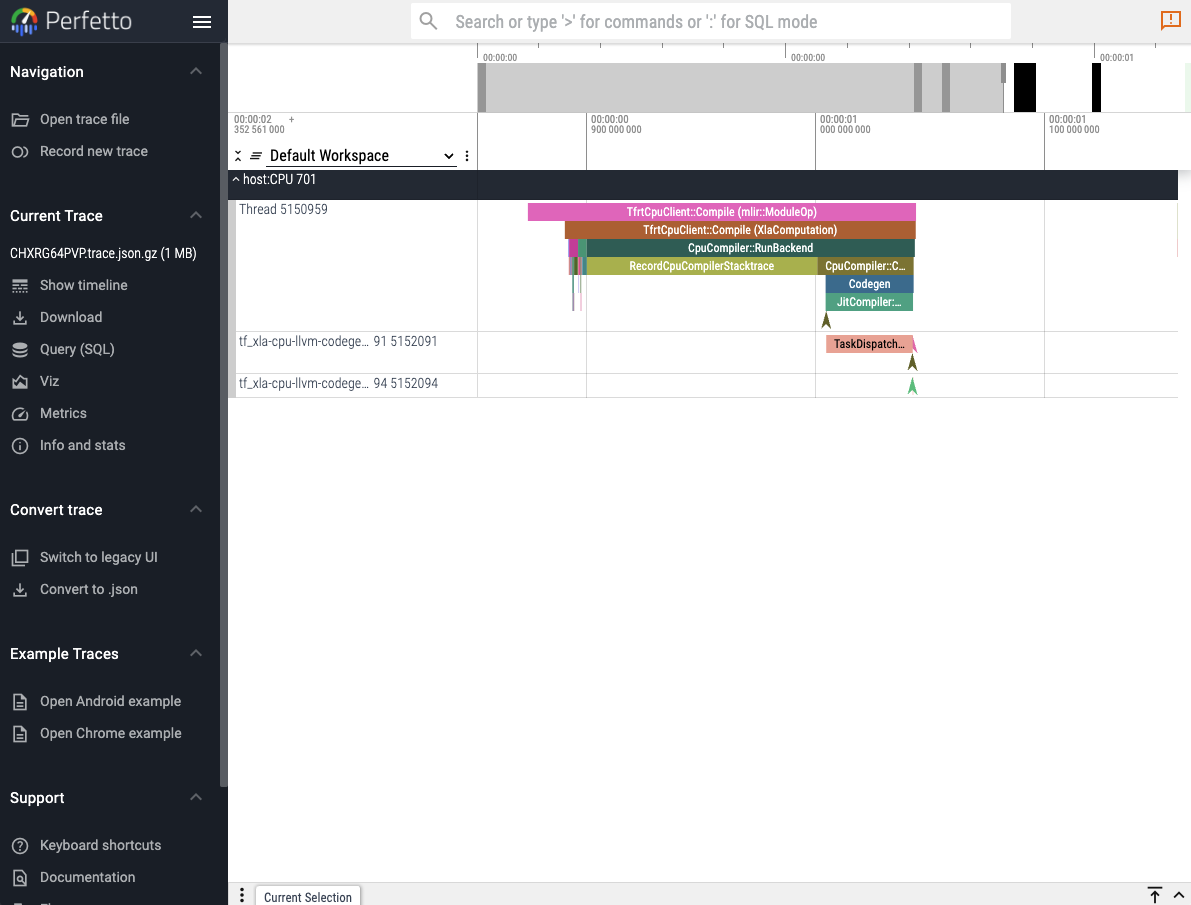
The first and easiest way to visualize a captured trace is to use the online perfetto.dev tool. Reactant.with_profiler has a keyword parameter called create_perfetto_link which will create a usable perfetto URL for the generated trace. The function will block execution until the URL has been clicked and the trace is visualized. The URL only works once.
Reactant.with_profiler("./"; create_perfetto_link=true) do
    mylinear = Reactant.@compile linear(x, W, b)
    mylinear(x, W, b)
end
Note
It is recommended to use the Chrome browser to open the perfetto URL.
XProf
XProf is a complete web UI to analyze the log files captured by Reactant. It can be installed in the following manner:
pip install xprof # or xprof-nightlyLaunching xprof is then as simple as:
xprof --logdir=./which will then make the xprof interface available on port :8791 by default.
Tensorboard
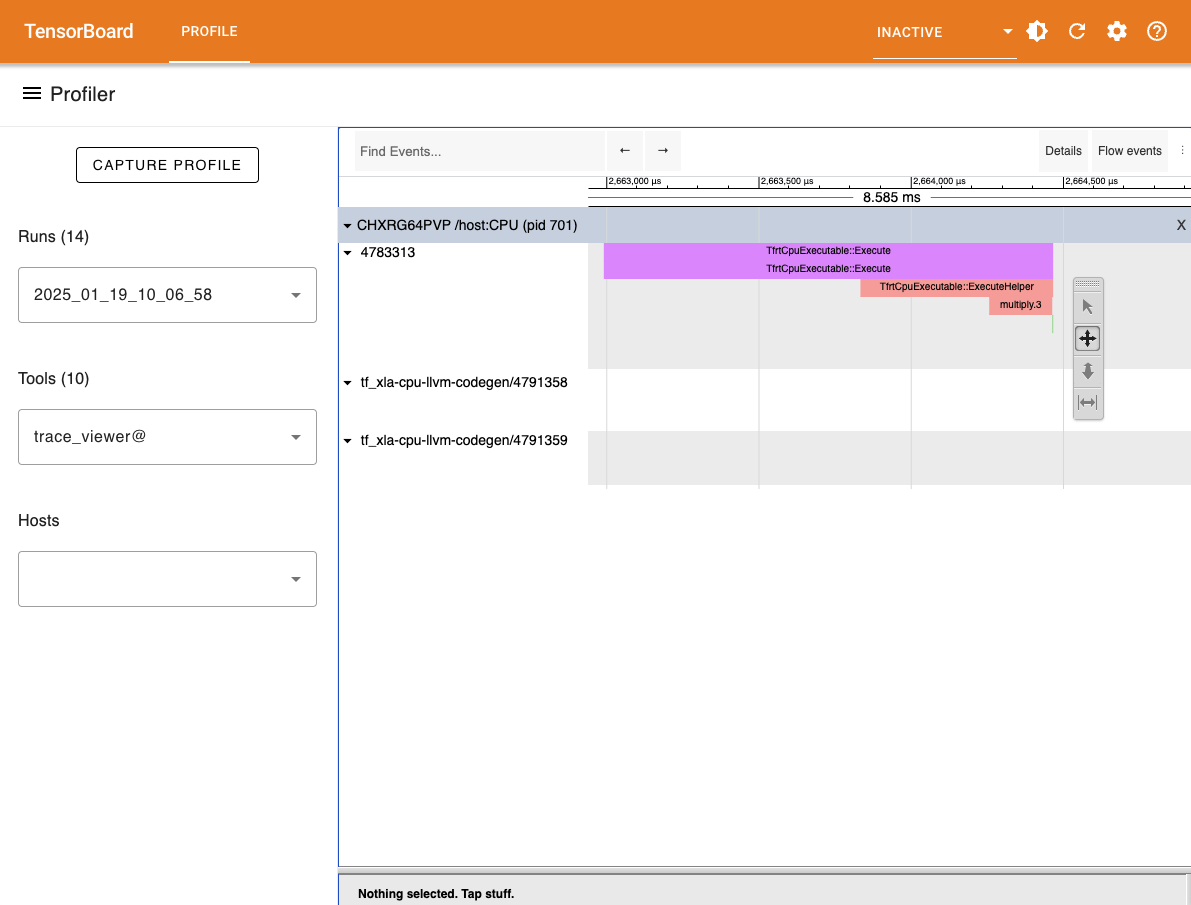
Another option to visualize the generated trace files is to use the tensorboard profiler plugin. The tensorboard viewer can offer more details than the timeline view such as visualization for compute graphs.
First install tensorboard and its profiler plugin:
pip install tensorboard tensorboard-plugin-profileAnd then run the following in the folder where the plugins folder was generated:
tensorboard --logdir ./Adding Custom Annotations
By default, the traces contain only information captured from within XLA. The ReactantCore.@annotate macro can be used to annotate traces. It is a no-op when only ReactantCore is loaded, allowing libraries to add annotations without depending on Reactant. Loading Reactant activates the annotations in host-side profiles.
using Reactant

Reactant.Profiler.@annotate "my_annotation" begin
    # Do things...
end
The added annotations will be captured in the traces and can be seen in the different viewers along with the default XLA annotations. When the profiler is not activated, then the custom annotations have no effect and can therefore always be activated.